How to Capture Emails From Your YouTube Subscribers (Without Asking)
You have built a YouTube channel. Maybe 5,000 subscribers, maybe 50,000. You show up consistently, the watch time is solid, and new subscribers keep coming in. What you do not have — and what YouTube will never give you — is a list of their email addresses.
That is not an accident. It is the business model.
YouTube needs you to keep posting so people keep coming back to YouTube. If you could email your subscribers directly, you could send them to your course, your community, your store — without YouTube in the middle. YouTube has no interest in enabling that. So they give you analytics on views, impressions, and watch time. They give you zero contact information for the people who chose to follow you.
This guide is about fixing that problem using one field that every YouTube channel already has: the website link.
YouTube Owns Your Subscriber Relationship — Not You
When a viewer clicks "Subscribe," they are not subscribing to you. They are subscribing to a notification preference inside YouTube's system. YouTube controls when and whether that notification reaches them.
The data on YouTube notification reach is not encouraging. YouTube sends notifications to roughly 30% of a channel's subscribers by default — and subscriber open rates on those notifications are significantly lower. When you upload a video, most of your subscribers never know it exists.
This is not a bug. YouTube's algorithm determines which content to surface based on predicted engagement, watch time, and a dozen other signals. If your video underperforms early, the algorithm shows it to fewer people. Your subscriber count becomes a ceiling, not a guarantee.
Email is different. When you send an email to your list, it arrives in every inbox. The average email open rate across industries in 2026 is around 41%. For niche creator audiences — people who deliberately signed up — it is higher. You control the send time, the subject line, and the frequency.
The math is not subtle. A channel with 10,000 subscribers using YouTube notifications reaches maybe 3,000 people at most — and then only the fraction who open the notification. A creator with 10,000 email subscribers reaches 4,100 people directly, on demand, with no algorithm between them.
The Channel Link Most Creators Waste
Go to your YouTube channel and open the customization settings. Under the "Basic info" tab, you will find a "Links" section. YouTube allows you to add up to 14 links to your channel profile, and one of them can be displayed on your channel banner as a featured link.
Most creators point that link to their Linktree. Which sends visitors to a page full of more links — and collects nothing.
That featured channel link is the most direct path between an interested viewer and your contact list. Someone who navigates to your YouTube channel page, scrolls through your videos, and then clicks your website link is not a casual passerby. They are looking for more. They are the exact person you want to capture.
Pointing that link to a page that asks for nothing — and gives you nothing — is one of the most common and costly mistakes YouTube creators make.
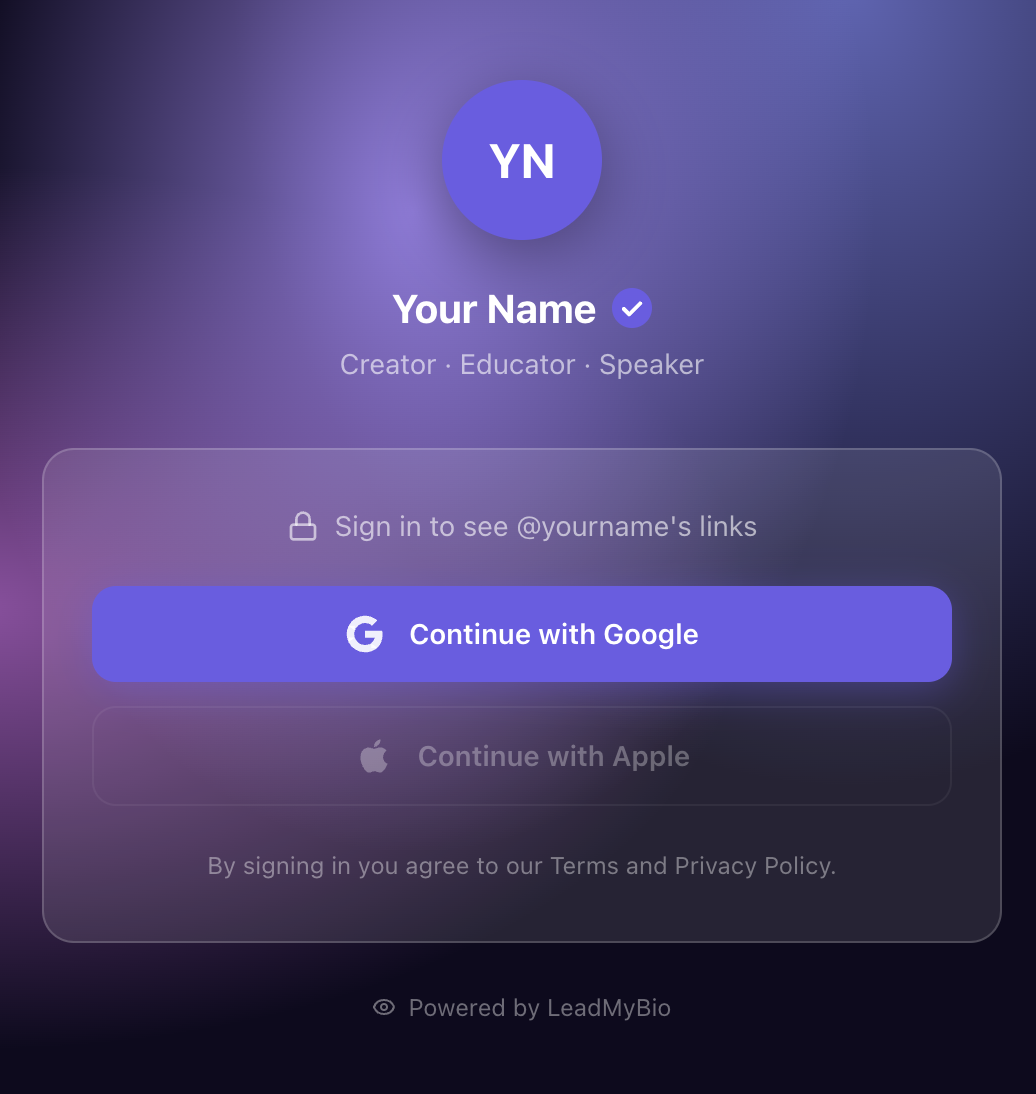
How LeadMyBio Turns Your Channel Link Into an Email Capture Machine
LeadMyBio is a link-in-bio tool built around one core mechanic: visitors log in with Google before they see your links. No form. No lead magnet. No offer required.
When someone clicks your channel link and lands on your LeadMyBio profile, they see a clean page with your photo and a "Continue with Google" button. One tap. Google autofills their verified name and email. Then your links appear.
This works because Google login removes every friction point that kills opt-in forms:
- No typing an email address (and mistyping it)
- No worrying about spam (Google accounts are real, verified addresses)
- No distrust of a random form field
- No decision fatigue — it is one button, not a form with five fields
The result is a 15–20% conversion rate on visitors, compared to 2–5% for traditional email forms. And the emails you capture are real — not throwaway addresses people use to grab lead magnets and never check.
Setting It Up on YouTube
Step 1: Create your LeadMyBio profile at leadmy.bio/login. Takes about five minutes. Add your links — your latest video, your course, your community, your store.
Step 2: Go to YouTube Studio → Customization → Basic info. In the Links section, set your website URL to leadmy.bio/yourusername.
Step 3: Make sure to check the option to display one link on your channel banner. This puts your LeadMyBio link in front of every channel visitor.
That is it. Every person who clicks your channel link now goes through a Google login before they see your links. Every one of them becomes a named, verified lead.
The Video Description Strategy
Your channel bio link captures people who visit your channel page. But your most active viewers are watching videos, not browsing channel pages.
Put your LeadMyBio link in every video description.
Not buried at the bottom. In the first two lines — the part visible before "Show more." YouTube truncates descriptions after roughly 100 characters in the watch view, so position matters.
A simple format that works:
My free [resource/newsletter/community]: leadmy.bio/yourusername

...rest of description
You can also mention it verbally in the video. The most natural way is to reference it at a relevant moment: "If you want to go deeper on this, I put together [resource] — link's in the description." No hard sell. Just a contextual mention when it makes sense.
The combination of channel bio link and description links means you are capturing emails from two different audiences: people discovering your channel for the first time, and people actively watching your content.
Subscriber Count vs. Email List: What the Numbers Actually Mean
Creators tend to treat subscriber count as a measure of audience size. It is actually a measure of YouTube's audience — people who have expressed interest in your content within YouTube's ecosystem.
Here is a comparison of what you own with each metric:
| Metric | You own it? | Direct access? | Platform-dependent? | Contact info? |
|---|---|---|---|---|
| YouTube subscribers | No | No (notifications only) | Yes | No |
| Email subscribers | Yes | Yes (send anytime) | No | Name + email |
| Instagram followers | No | No (algorithm) | Yes | No |
| TikTok followers | No | No (algorithm) | Yes | No |
YouTube can change its algorithm tomorrow and cut your reach by 60%. They have done it before. They will do it again. Your email list does not change when YouTube updates its notification policy.
This is especially important for creators who are building toward something — a course launch, a product release, a community, a coaching offer. You do not want to be dependent on YouTube's algorithm on launch day.
Why This Matters Most at Launch
Course creators and product launchers understand this the fastest. Consider two scenarios:
Scenario A — YouTube only: You have 20,000 subscribers. You upload a launch announcement video. YouTube notifies 30% of subscribers — 6,000 people get the notification. Of those, maybe 40% open it — 2,400 people. Your video gets 1,500 views. Maybe 3% convert — 45 sales on day one.
Scenario B — YouTube + email list: You have 20,000 subscribers and 8,000 email subscribers (built over time via your bio link and descriptions). You send a launch email to 8,000 people. 41% open it — 3,280 people read your launch message. You also upload the video. Combined: significantly more people reached directly. Email converts at 2–4x the rate of cold social traffic.
The email list does not replace YouTube. It multiplies what YouTube already does. Your videos build trust and attract new viewers. Your email list converts them when it counts.
What to Do With the Emails Once You Have Them
LeadMyBio connects with major email platforms — so every lead captured goes directly into your Mailchimp, ConvertKit, or other list without manual export.
For most YouTube creators starting out, a simple sequence works:
- Welcome email (day 0): Confirm who you are and what they can expect. Link to your best video or resource.
- Value email (day 3): Share something useful — a tip, a framework, a resource relevant to your channel topic.
- Soft offer (day 7): If you have a product, community, or service, introduce it naturally.
You do not need a complex automation on day one. You need a list. The strategy can come later. The contacts you do not capture today are gone — you cannot go back and retroactively collect emails from people who visited your channel last year.
The Default Is Leaving Contacts on the Table
Every day your channel bio link points to a Linktree or a generic website is a day you are letting interested viewers walk past without capturing their information. They came to your channel, which means they are already engaged. The only question is whether you collect that engagement as a lasting contact or let it evaporate.
The setup takes five minutes. The compounding effect — a growing list of verified emails that you own, regardless of what YouTube does to its algorithm — takes months. The best time to start is the first day your channel had subscribers. The second best time is today.
Ready to stop renting your audience? Set up your LeadMyBio profile in 5 minutes. Free forever up to 1,000 leads. No credit card required. Create your free profile →
Ready to start capturing real leads?
Set up your LeadMyBio profile in 5 minutes. Free forever up to 1,000 leads.
Create your free profile →